Monitoring Regulations
Monitoring Regulations
Under CMS guidelines, patient monitoring for RTM services must be conducted through an RTM platform and must follow specific, time-based requirements.
The guidelines are as follows:
- Patient monitoring must be performed using an approved RTM platform that collects and stores patient-reported data.
- Monitoring time must be active and interactive, including reviewing patient data, documenting findings, and communicating with the patient as needed.
- Only time spent by qualified healthcare professionals may be counted toward RTM monitoring minutes.
- Monitoring time must be accumulated within the defined billing period and meet minimum time thresholds required for each RTM CPT code.
- Time spent must be accurately documented in the platform to support billing and compliance requirements.
Note:
Due to CMS regulations, if your clinic is subscribed to the Fully Managed RTM Service,
only the assigned remote therapist may add monitoring time to a patient’s billable units.
How to Monitor Patients
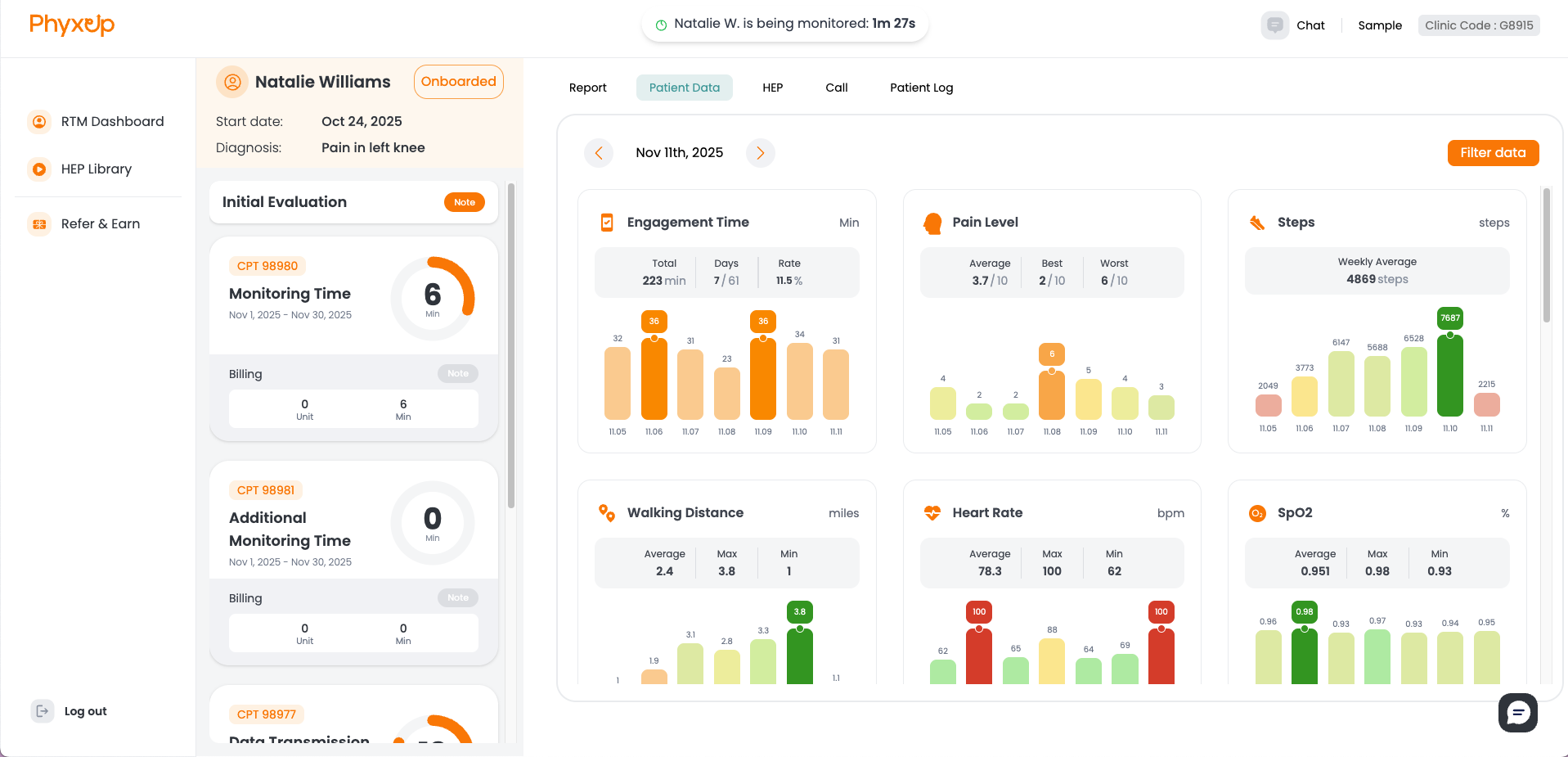
Monitoring patients is the primary task for therapists using PhyxUp Health’s RTM platform.
If your clinic is subscribed to the Fully Managed RTM Service, PhyxUp Health’s remote therapist
team will monitor and support patients on your behalf.
Patient monitoring begins by opening the patient dashboard from the main RTM Dashboard.
Time spent on the patient dashboard is recorded as monitoring time and is used to support billing requirements
for CMS-regulated RTM CPT codes.
From the patient dashboard, you can review the patient’s current status and activity, including data graphs,
Home Exercise Program (HEP) assignments, and the patient log. You can also make and document patient calls
directly from this page.
Note:
Monitoring time begins tracking as soon as you enter the patient dashboard and is visible at the top of the page.
Be mindful of how long you remain on the dashboard to avoid recording excessive monitoring time.
What to Look For When Monitoring Patients
When monitoring patients, review the following:
- Engagement and feedback with assigned Home Exercise Programs (HEP)
- Pain level trends
- Health data (synced with native health systems such as Apple Health)
- General condition (mood, concerns, new or worsening symptoms)
In addition to app usage and exercise activity, watch for any signs or changes that may indicate a shift
in patient status, even if it is not directly reflected in platform data.
Tip:
Use the chat and call features to gather context about the patient’s condition at home
and guide them through their treatment plan.
When to Monitor Patients
Due to CMS requirements, patient monitoring should only take place when one or more of the following applies:
- The patient has uploaded new data that needs review
- Patient-provider interaction is occurring (sending messages or conducting a check-in call)
- You are reviewing or updating the patient’s HEP assignments
Important:
If none of the conditions above are met, do not open the patient page and do not add monitoring time.
Checking for Uploaded Data
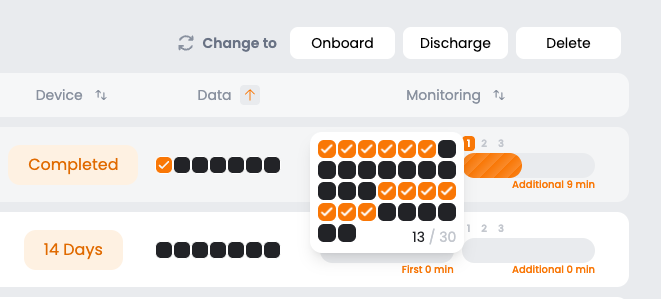
To see whether a patient has uploaded new data, check the Data column on the RTM Dashboard
(right side of the page). This column displays the patient’s data transmission activity across their
30-day billing cycle.
Each box represents one day:
- Orange boxes indicate days when the patient uploaded data
- Black boxes indicate days with no data transmission
In the example above, the patient uploaded data on 13 of the past 30 days and has not uploaded any data
for the last 6 consecutive days.
Length of Monitoring Sessions
Monitoring time should be proportional to patient activity and the amount of data submitted in the platform.
As a general guideline, each individual data point (pain levels, engagement time, HEP feedback, or other metrics)
typically corresponds to approximately 30 seconds to 1 minute of monitoring time.
As patient engagement increases, additional monitoring time may be appropriate.
Note:
Due to RTM CPT billing requirements, therapists should typically aim to document at least
20 minutes of monitoring time per patient each month.